 Assigning Mapping and Standardization
Permission to Users
Assigning Mapping and Standardization
Permission to Users
To set up users you must assign permission for each facility that you want the user to have the ability to Map/Standardize.
- Start Chargemaster Toolkit then, from the main menu, select File > Users. The User Manager displays.

- In the column that represents the ‘corporate standard’
file for your facilities put a check in the box for the user you want
to assign as a Corporate User then select the
 icon. (In
the example above, the corporate standard file is Corpor...)
icon. (In
the example above, the corporate standard file is Corpor...)
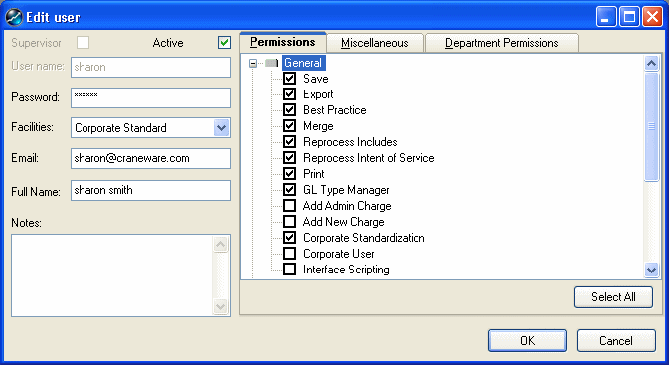
- In the Permissions tab, click on the cross beside General then check the Corporate Standardization box.
Selecting the Corporate Standardization box means you are assigning permission to map field types (e.g. HCPCS/CPT codes, descriptions, etc.) between the Corporate Standard file and other facility files, to Standardize files (create links between individual charge items across different facility files) using the Standardization Wizard, and to use the Resynchronization Tool. (Mapping field types, using the Standardization Wizard and using the Resynchronization Tool requires that the user is assigned to the Corporate Standard and at least one ‘other’ facility.)
Corporate Standardization = Ability to map field types, run the Standardization Wizard and use the Resynchronization tool for ALL departments (that the user has been assigned permission to access).
- Click on the OK button. The User Manager displays.
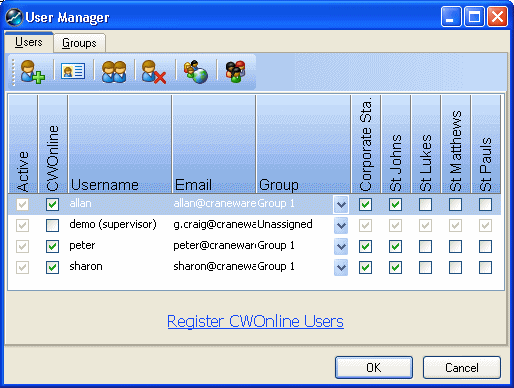
- Repeat steps 2 to 4 for all users you want to assign corporate standardization permission to. (Remember that you must assign Corporate Standardization permission in each of the facilities the user is to work with.)
- When you are done click on the OK button.
In this example we have assigned permission for ‘Sharon’ to Map Linkages, Standardize, and use the Resynchronization Tool for all departments within the facilities with green check marks against them.
When assigning corporate permissions you must ensure that the user is assigned to at least one other facility (with the appropriate permissions) in order that the user has a facility to standardize against the corporate standard file.