 To
use the Device Back Billing Module
To
use the Device Back Billing Module
- Select Modules > Device Back Billing. The Device Back Billing window opens.
- Highlight the appropriate
charge item. Right-click on the charge item and select Categories. A list of categories will be displayed in the popup
menu.
Each category has one or more sub categories which will also be displayed in the popup menu. Alternatively, you may choose to select the Ignore Charge Item option if none of the options are appropriate.
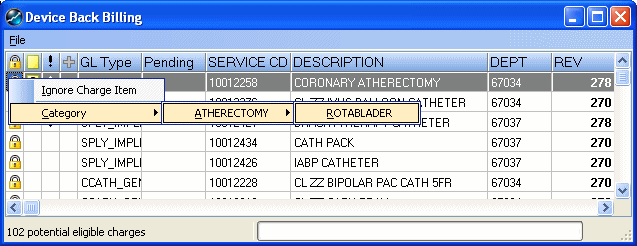
*Once a charge item has been ignored, it will not reappear in the Device Back Billing Module again.
- For the charge items that
qualify, select an appropriate category for the type of device represented.
For example Balloon,
then Dilation.
A CPT® information window will appear displaying the following details
for the selection made:
- CPT® Code Indicator Check box - Used to indicate the selected CPT® code. The selected code will populate the CPT® Code field below.
- CPT® Code / Device to Category Crosswalk - Click on the Device to Category Crosswalk link to view all relevant Category codes for that CPT® code.
- Long Description - The full Long Description for the CPT® Code.
- Revenue Codes - All Revenue Codes appropriate for the selected CPT® Code.
- Program Memorandums - Links to all associated CMS Program Memorandums in their original published state.
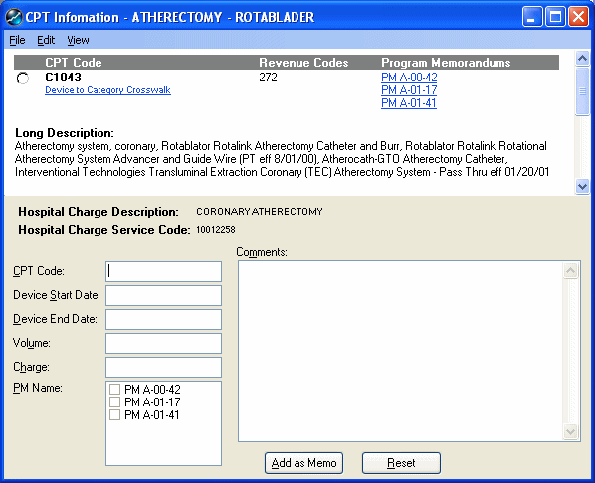
- Select a HCPCS code for your device charge indicating your selection by clicking in the check box to the left of the HCPCS Code. The CPT® Code field is now populated with the code selected. This code may or may not be the code utilized on the back bill, depending on the additional information found in the Program Memorandums. This initial HCPCS code may have a very defined billing period, and may have replacement codes when billing for later dates of service.
- Examine each of the PMs listed for the selected CPT® Code by selecting the links displayed on the right. You may indicate the relevant Program Memorandums by checking the appropriate box in the PM Name field on the lower left hand side.
It is important that you read all PM's in the order in which they were published so that you enter accurate coding and billing date information. Enter all of the appropriate information concerning this device. This information may include the following:
- The HCPCS code(s) which identify this device during it's coverage period.
- The date the particular device first became eligible for payment.
- The date the device became in-eligible for payment.
- The CMS Program Memorandums which support the billing of this device.
- The replacement codes and billing periods necessary when billing for this device.
Type your drop-down text here.
To
search a program memorandum
Use the binoculars icon to search for the selected HCPCS code or device name within the program memorandum.
To
copy text from a Program Memorandum
Use the 'T' icon to switch to text copy mode. This allows you to select text and copy/paste information from the PM into your memo window using the standard windows options (e.g. right click options or keyboard shortcuts Ctrl C / Ctrl V, etc).
The types of information you may wish to copy from the PM and permanently
place in your memo could be:
- Your device's HCPCS code definition as written in the memo.
- The effective date of the change identified in the memo.
- The publication date of the PM.
- The replacement code for the initial code and effective date of the replacement.